A CMS for Keynote, Course Calendars, and Canvas
I love the creative process of designing my courses, lectures, and discussions, and I grieve at the drudgery of pre-semester revisions.
A course is a 16-week-long narrative. But our teaching tools force that story into silos: LMS fields, pages and modules, and sequential Keynote files that privilege structured data and file management over flexibility. In a course with 25–30 lectures (700 slides) it is both time consuming and error-prone to add and reshuffle modules, keep recurring elements in sync across decks and maintain date alignment between lectures, Canvas and the printed syllabus. It is not a tragedy, but is it an annoying administrative overhead that does not per se contribute to the teaching.
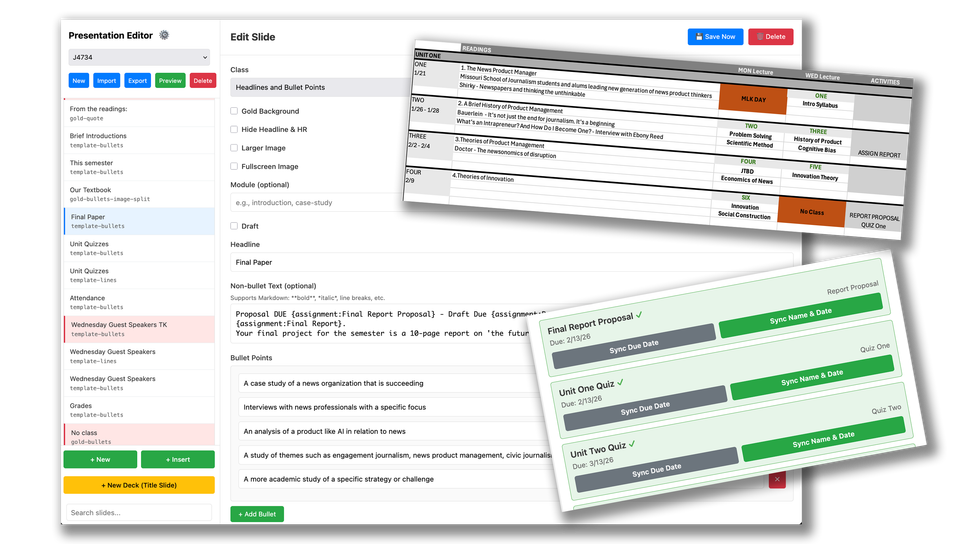
So after building a Canvas announcement tool last summer, this holiday break I designed a CMS for Keynote decks which also keeps Canvas assignments and dates in sync, and outputs everything to a one-page semester calendar for the syllabus. (Examples shown in the image above.)
Briefly: It is a Flask app running locally on my Mac with data in SQLite. Courses, decks and slides are authored and individual lectures are exported to PPT using python-pptx and a designed PowerPoint template (.potx) that is easily opened within Keynote. A web preview or PDF export is also available. Variables that change semester-to-semester are imported from a CSV and include assignment names and dates, guest speakers and weekly reading lists. The tool is not designed to author a new Canvas course, but it works effectively to maintain one.
Basic features:
- Provides a variety of slide templates to accommodate different content, photos and animated GIFs.
- Allows multi-selection and drag-drop of slides between decks in a course.
- Utilizes 'linked slides" providing a parent-child relationship across different decks or courses so the content is always in sync.
- Uses the imported list of assignments to inject variables into slides that are rendered into the correct/current names and due dates on export.
- Enables naming and grouping sub-sets of slides for easy searching and insertion into other decks or courses.
- Allows searching on text to find slides within a course.
- Associates each deck with a lecture date that allows easy reordering.
All of that boils down to a separation of content from design and presentation so course lessons can be managed in a single interface as a coherent whole rather than a fragmented collection of files.
To keep assignment dates aligned in Canvas, there is a simple form to connect imported assignment names and dates with Canvas assignments to force a synchronization of either the name, date or both. This is a simple integration using the Canvas API.
To create the syllabus calendar we use openpyxl to create a one-page semester summary that includes lecture topics, readings and assignments in a week-by-week summary format.
For next steps, I plan to further de-center Canvas, allowing the local app to create assignments and pages to further establish it as the single source of truth. At some point, I will also post the code to Github, though the design is so idiosyncratic it may be useful mostly for reference not turnkey use.
Member discussion